Back In Business!
Saturday, October 6, 2007
The CafePress gods have finally smiled upon us and the Store wide Price changer is FINALLY fixed. It's a little wonky, but as long as it works..I'm THRILLED! I cannot believe how long it took them to fix it. I've been waiting since September 13th! Argh! I can finally start adding to the store again. It just wasn't worth it to do all of that dang work and none of the prices be right.
In light of things finally being fixed, I'm doing some hard core promoting of BOTH stores.
www.kimiskustoms.com
 Kimi's Kustoms Family Store
 Kimi's Kustoms Adult Store
Here are the cut off dates for ordering your Halloween stuff!
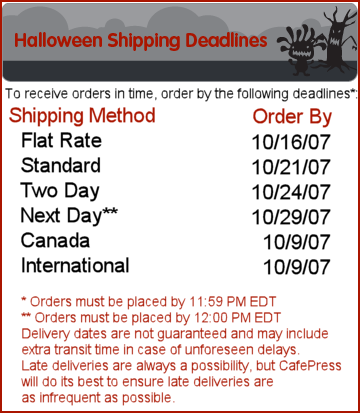
Be sure to check out our great selection of Halloween shirts and especially our tote bags - perfect for your first time trick or treaters!


Labels: advertising, cafe press, cafepress, clothes, commission junction, costumes, first halloween, halloween, holidays, kids, Kimi, marketing, money, Online, shirts, shopping, stores
Darn Store Price Changer!
Saturday, September 15, 2007
For the past two days, the feature on CafePress that lets a shop keeper change their prices store wide, has been broken. This is driving me bonkers. I know they are working on it, but it doesn't look good on my end.
My prices haven't been "sticking" for a week or so now. Instead, I've been putting in the new designs and products and simply hiding the sections until I got the prices fixed - by using the store wide price changer. With that broken, I now have a bunch of hidden sections in my store because the prices are all wrong and it would take me years to change all of that to the correct prices. Bleh.
So now, it seems like I haven't added anything new in the past few days - when I really have. I usually add new stuff every week..at least one new design. I'm trying to finish gearing up for Christmas and have several designs just sitting and waiting to be put on my virtual shelves. And waiting is costing me time..and money. Poo on you CafePress store wide changer thingy ma bob! lol
Labels: blogging, cafe press, cafepress, christmas, commission junction, goals, google, holidays, kids, marketing, money, Online, search engine optimization, shirts, shopping
Best CafePress Shop?
Monday, September 10, 2007
Do you like our designs, but maybe can't afford to buy anything and support us? Are you looking for a way to help out, and don't know how? That's
GREAT, and I have the solution(s) for you!
Here is a list of possible ways to help promote Kimi's Kustoms:
1. Post a link to our website (
http://www.kimiskustoms.com) or our store (
http://www.cafepress.com/kimiskustoms) on your personal website. You can use Squidoo, LiveJournal, Blogger, MySpace, your own website and more! *Note that when using MySpace, you must use http://www.kimiskustoms.com and you do so at your own risk. Please read the
MySpace Terms of Use for more details on advertising.*
2. You can simply post a banner with our store URL on it! You can create your own, or you can use our newest banner. *Please do not hot link! Save it to your computer and host it yourself so that everyone can enjoy the use of the banner!

3. Purchase a
Kimi's Kustoms Bumper Sticker for your car!
4. Blog about us! You can include us in any of your blogs. You can even link your favorite designs / products to show off to your friends!
5. Email your family and friends about us!
6. Vote for us Every Day at the following sites:


 TopSiteList
 Free TopSite
7. Check out our
Affiliates page in order to learn how to make money supporting our store!
Labels: advertising, affiliates, bumper sticker, cafe press, cafepress, clothes, commission junction, family, marketing, money, rewards, shopping, squidoo
Bumper Sticker
I'm always looking for another way to advertise my store. There seem to be only so many ways to do so without spamming. Another shopkeeper on the CafePress forums, suggested a bumper sticker. I mean, that's what they are for right? My husband isn't real into the idea. I don't think he wants my website URL all over his car. Well, tough noogies. lol
I made a bumper sticker tonight - finally. I like it, and am anxious to get it in the mail. I've yet to order anything from myself, so this will be a learning experience for me. If it looks as good in print as it does on my computer, I'm thinking of buying a few for family members and seeing if I can convince them to stick it on their cars. Heehee
Anywhoooo if anyone reading this is interested, the bumper sticker can be found
Here!
Labels: advertising, affiliates, bumper sticker, cafe press, cafepress, commission junction, marketing, shopping
Stand Alone Site - Completed!
Finally, after hours upon hours of hard work, I have completed the stand alone site
www.kimiskustoms.com! It was an amazing amount of work. I've never done a full website before and I have to say, all of the FTP, SQL, SOB, SHOL, Blah Blah Blah was incredibly confusing for me. I've never gone to school for this sort of thing so the acronyms and terminology really threw me off. Like my friend Chris says, nerds like to use big words and flashy acronyms to look cool and smart. Well, they certainly got me stumped for a while.
It feels really good to have all of it done, and I think it looks pretty nice. I tried to incorporate the design into both the store and the stand alone site so people don't even realize they are going from one place to another. I think it flows well. Of course, my opinion doesn't really matter. We'll have to see what the customers (and Google!) think of it. Ha!
Labels: affiliates, cafe press, cafepress, commission junction, shopping, stores
Store Affiliates
Monday, September 3, 2007
I'm super excited to see how many other CafePress stores are suddenly linking my products. I use Google Analytics and have been noticing a little more traffic lately. Upon digging through my reports, I notice that there are a few stores linking to my stuff (BIG stores, who I never thought would use my designs for affiliate linking). I'm not sure why they chose me, but that's great! I hope we both make money off of it. :)
If you are interested in become a Kimi's Kustoms Affiliate, follow these steps!
Directions:1. Bookmark
Kimi's Kustoms so you can find your way back easily.
2. Follow this link and review the agreement terms -->
Publisher Sign Up.
3. Fill Out the online application.
4. Wait for Commission Junction to send you a confirmation email.
5. Head to
www.cj.com and log in (the log in area is to you top right.
6. Click on "Account" then "Web site Settings" and copy your PID number for your website. (it will be located beneath "name")
7. If there are no listed websites, click 'Add A New Web Site', fill out the information for the site that will be displaying the banner advertising (such as your personal website). A New PID number will be issued to you. Once you retreive the PID number write it down somwhere some you won't lose it.
8. Come back to Kimi's Kustoms and select your favorite banner to place wherever you'd like where advertising is allowed! Note: Replace the “XXXXXXX” with your pid number.
9. Enjoy your commission!
Choose a Banner Style:

Labels: affiliates, cafe press, commission junction, shopping, stores

 <$BlogRSDUrl$>


